Sunday, October 6, 2019

HOW TO CREATE PATTERNS USING VB PROGRAMMING.

Hi Friends Today i will show you how you can be Create Pattern in VB(Visual Basic 6.0)


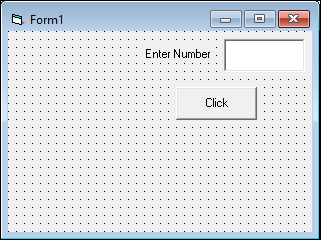
  • To Create Pattern you need to insert One Label Control's.
  • And another Control's need to insert is  One Text box Control.
  • One Command button is placed to the form.
  • As Shown in Picture Arrange it.
  • For Output or Display of Pattern in Form we use an Print Statement. 
  • In this Example I used default names of Control. 
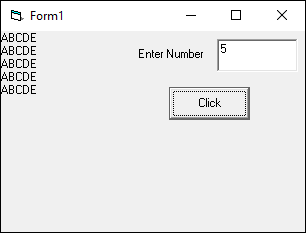
The Pattern is Look's Like
ABCDE
ABCDE
ABCDE
ABCDE
ABCDE

Coding of Pattern

Private Sub cmdClick_Click()
Dim n, a As Integer
n = Val(Text1.Text)
For i = 1 To n
    a = 65
    For j = 1 To n
        Print Chr(a);
        a = a + 1
    Next j
    Print
Next i
End Sub
Code Window

Design View

Output View

HOW TO CREATE PATTERNS USING VB PROGRAMMING.

Hi Friends Today i will show you how you can be Create Pattern in VB(Visual Basic 6.0)


  • To Create Pattern you need to insert One Label Control's.
  • And another Control's need to insert is  One Text box Control.
  • One Command button is placed to the form.
  • As Shown in Picture Arrange it.
  • For Output or Display of Pattern in Form we use an Print Statement. 
  • In this Example I used default names of Control. 
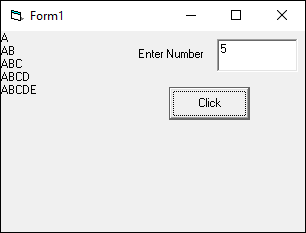
The Pattern is Look's Like
A
AB
ABC
ABCD
ABCDE

Coding of Pattern

Private Sub cmdClick_Click()
Dim n, a As Integer
n = Val(Text1.Text)
For i = 1 To n
    a = 65
    For j = 1 To i
        Print Chr(a);
        a = a + 1
    Next j
    Print
Next i
End Sub
Code Window

Design View

Output View

Thursday, October 3, 2019

HOW TO CREATE PATTERNS USING VB PROGRAMMING.

Hi Friends Today i will show you how you can be Create Pattern in VB(Visual Basic 6.0)


  • To Create Pattern you need to insert One Label Control's.
  • And another Control's need to insert is  One Text box Control.
  • One Command button is placed to the form.
  • As Shown in Picture Arrange it.
  • For Output or Display of Pattern in Form we use an Print Statement. 
  • In this Example I used default names of Control. 
The Pattern is Look's Like
11111
22222
33333
44444
55555

Coding of Pattern

Private Sub cmdClick_Click()
Dim n As Integer, i As Integer
n = Val(Text1.Text)
For i = 1 To n
    For j = 1 To n
        Print i;
    Next j
    Print
Next i
End Sub


Code Window

Design View

Output View

HOW TO CREATE PATTERNS USING VB PROGRAMMING.

Hi Friends Today i will show you how you can be Create Pattern in VB(Visual Basic 6.0)


  • To Create Pattern you need to insert One Label Control's.
  • And another Control's need to insert is  One Text box Control.
  • One Command button is placed to the form.
  • As Shown in Picture Arrange it.
  • For Output or Display of Pattern in Form we use an Print Statement. 
  • In this Example I used default names of Control. 
The Pattern is Look's Like
1
22
333
4444
55555

Coding of Pattern

Private Sub cmdClick_Click()
Dim n As Integer, i As Integer
n = Val(Text1.Text)
For i = 1 To n
    For j = 1 To i
        Print i;
    Next j
    Print
Next i
End Sub
Code Window

Design View

Output View

Tuesday, September 24, 2019

C++ Language Program for Subtraction of n Numbers.


BACHELOR OF COMPUTER APPLICATION (B.C.A.) FIRST SEMESTER
Here you will get simple C++ program 

C++ Language Program for Subtraction of n Numbers.


IT IS THE SMALLEST LOGIC USED FOR CODING OF THIS PROGRAM.

IN WHICH YOU CAN CREATE OWN VARIABLES AND FUNCTIONS.

User will input two numbers and that numbers is subtracted by Subtraction Logic ,then it subtract them and display on screen.

The program coding is given below.


#include <iostream.h>
#include <conio.h>
class SUB
{
int n, sub;
public:
void getdata()
{
cout << "Enter a positive integer: ";
    cin >> n;
}
void display()
{
sub=0;
for (int i = 1; i <= n; ++i)
{
        sub -= i;
    }
    cout << "Subtraction = " << sub;
}
};
void main()
{
clrscr();
SUB s1;
s1.getdata();
s1.display();
getch();
}

Output will be given after you compile it.

Saturday, September 21, 2019

C++ Language Program for Subtraction of Two Numbers.

BACHELOR OF COMPUTER APPLICATION (B.C.A.) FIRST SEMESTER
Here you will get simple C++ program 

C++ Language Program for Subtraction of Two Numbers.


IT IS THE SMALLEST LOGIC USED FOR CODING OF THIS PROGRAM.

IN WHICH YOU CAN CREATE OWN VARIABLES AND FUNCTIONS.

User will input two numbers and that numbers is subtracted by Subtraction Logic ,then it subtract them and display on screen.

The program coding is given below.

#include <iostream.h>
#include <conio.h>
class SUB
{
int a,b,c;
public:
void getdata()
{
cout<<"Enter Any Two Number: ";
cin>>a>>b;
}
void display()
{
c=a-b;
cout<<"Subtraction is = "<<c;
}
};
void main()
{
clrscr();
SUB s1;
s1.getdata();
s1.display();
getch();
}

Output will be given after you compile it.

Friday, September 20, 2019

C++ Language Program for Addition of n Numbers.

BACHELOR OF COMPUTER APPLICATION (B.C.A.) FIRST SEMESTER
Here you will get simple C++ program 

C++ Language Program for Addition of n Numbers.


IT IS THE SMALLEST LOGIC USED FOR CODING OF THIS PROGRAM.

IN WHICH YOU CAN CREATE OWN VARIABLES AND FUNCTIONS.

User will input n Numbers and that Numbers is Added by Logic, Then it Addition will be display on screen.

The program coding is given below.

#include <iostream.h>
#include <conio.h>
class ADD
{
int n, sum;
public:
void getdata()
{
cout << "Enter a positive integer: ";
    cin >> n;
}
void display()
{
sum=0;
for (int i = 1; i <= n; ++i)
{
        sum += i;
    }
    cout << "Sum = " << sum;
}
};
void main()
{
clrscr();
ADD a1;
a1.getdata();
a1.display();
getch();
}

Output will be given after you compile it.

Thursday, September 19, 2019

C++ Language Program for Addition of Two Numbers.

BACHELOR OF COMPUTER APPLICATION (B.C.A.) FIRST SEMESTER
Here you will get simple C++ program 

C++ Language Program for Addition of Two Numbers.


IT IS THE SMALLEST LOGIC USED FOR CODING OF THIS PROGRAM.

IN WHICH YOU CAN CREATE OWN VARIABLES AND FUNCTIONS.

User will input Two Numbers and that Numbers is Added by Logic, Then it Addition will be display on screen.

The program coding is given below.

#include <iostream.h>
#include <conio.h>
class Add
{
int a,b,c;
public:
void getdata()
{
cout<<"Enter Two Number=";
cin>>a>>b;
}
void display()
{
c=a+b;
cout<<"Addition is = "<<c;
}
};
void main()
{
clrscr();
Add a1;
a1.getdata();
a1.display();
getch();
}

Output will be given after you compile it.

Wednesday, September 18, 2019

HOW TO CALCULATE AREA OF RECTANGLE USING VB PROGRAMMING.

Hi Friends Today i will show you how you can be Calculate Area of Rectangle in VB(Visual Basic 6.0)


  • To Calculate Area of Rectangle you need to insert Two Label Control's.
  • And another Control's need to insert is  Two Text box Control.
  • One Command button is placed to the form.
  • As Shown in Picture Arrange it.
  • The Second Label for Output or Display of Calculate Area of Rectangle. 
  • In this Example I used default names of Control.  
  • Also we concatenate the Strings value to show proper Output in Label Control. 

Coding of Area of Rectangle

Private Sub cmdClick_Click()
Dim l As Integer, w As Integer
Dim area As Double
l = Val(Text1.Text)
w = Val(Text2.Text)
area = l * w
Label3.Caption = "Area of Rectangle is " & area
End Sub

Code Window

Output View
Design View


Monday, September 16, 2019

HOW TO CALCULATE AREA OF TRIANGLE USING VB PROGRAMMING.

Hi Friends Today i will show you how you can be Calculate Area of Triangle in VB(Visual Basic 6.0)


  • To Calculate Area of Triangle you need to insert Two Label Control's.
  • And another Control's need to insert is  Two Text box Control.
  • One Command button is placed to the form.
  • As Shown in Picture Arrange it.
  • The Second Label for Output or Display of Calculate Area of Triangle. 
  • In this Example I used default names of Control.  
  • Also we concatenate the Strings value to show proper Output in Label Control. 

Coding of Area of Triangle

Private Sub cmdClick_Click()
Dim h As Integer, b As Integer
Dim area As Double
h = Val(Text1.Text)
b = Val(Text2.Text)
area = (0.5) * h * b
Label3.Caption = "Area of Triangle " & area
End Sub

Code Window

Output View

Design View

Sunday, September 15, 2019

C++ Language Program for Sort Any Array in Ascending Order.

BACHELOR OF COMPUTER APPLICATION (B.C.A.) FIRST SEMESTER

Here you will get simple C++ program 
C++ Language Program Sort Any Array in Ascending Order.
IT IS THE SMALLEST LOGIC USED FOR CODING OF THIS PROGRAM.
IN WHICH YOU CAN CREATE OWN VARIABLES AND FUNCTIONS.

User will input will be an unsorted form in Array and that Array is sorted by Ascending Order,then it will be display on screen.


The program coding is given below.
#include<iostream.h>
#include<conio.h>
class Sort
{
int a[20],i,j,temp;
public:
void getdata()
{
cout<<"Enter elements of array:\n";
for(i=1;i<=5;i++)
cin>>a[i];
}
void sort()
{
temp=0;
for(i=1;i<=5;i++)
{
    for(j=1;j<=5;j++)
    {
       if(a[i]<a[j])
       {
temp=a[i];
a[i]=a[j];
a[j]=temp;
       }
    }
}
}
void display()
{
cout<<"Array after sorting:\n";
for(i=1;i<=5;i++)
{
cout<<" "<<a[i];
}
}
};
void main()
{
clrscr();
Sort s1;
s1.getdata();
s1.sort();
s1.display();
getch();
}
Output will be given after you compile it.

C++ Language Program for Sort Any Array in Descending Order.

BACHELOR OF COMPUTER APPLICATION (B.C.A.) FIRST SEMESTER

Here you will get simple C++ program 
C++ Language Program Sort Any Array in Descending Order.
IT IS THE SMALLEST LOGIC USED FOR CODING OF THIS PROGRAM.
IN WHICH YOU CAN CREATE OWN VARIABLES AND FUNCTIONS.

User will input will be an unsorted form in Array and that Array is sorted by Descending Order,then it will be display on screen.


The program coding is given below.
#include<iostream.h>
#include<conio.h>
class Sort
{
int a[20],i,j,temp;
public:
void getdata()
{
cout<<"Enter elements of array:\n";
for(i=1;i<=5;i++)
cin>>a[i];
}
void sort()
{
temp=0;
for(i=1;i<=5;i++)
{
    for(j=1;j<=5;j++)
    {
       if(a[i]>a[j])
       {
temp=a[i];
a[i]=a[j];
a[j]=temp;
       }
    }
}
}
void display()
{
cout<<"Array after sorting:\n";
for(i=1;i<=5;i++)
{
cout<<" "<<a[i];
}
}
};
void main()
{
clrscr();
Sort s1;
s1.getdata();
s1.sort();
s1.display();
getch();
}
Output will be given after you compile it.

C++ Language Program To Traverse Array.

BACHELOR OF COMPUTER APPLICATION (B.C.A.) FIRST SEMESTER

Here you will get simple C++ program 
C++ Language Program To Traverse Array.
IT IS THE SMALLEST LOGIC USED FOR CODING OF THIS PROGRAM.
IN WHICH YOU CAN CREATE OWN VARIABLES AND FUNCTIONS.

User will input will be in any order in Array and that Array is Traverse by Traversing ,then it will be display on screen.


The program coding is given below.
#include<iostream.h>
#include<conio.h>
class Node
{
int i,a[10];
public:
void getdata()
{
cout<<"Enter Number in Array=\n";
for(i=1;i<=5;i++)
{
cin>>a[i];
}
}
void display()
{
cout<<"\nArray\n";
for(i=1;i<=5;i++)
{
cout<<" "<<a[i];
}
}
};
void main()
{
Node n1;
clrscr();
n1.getdata();
n1.display();
getch();
}
Output will be given after you compile it.

Monday, September 9, 2019

HOW TO CALCULATE CIRCUMFERENCE OF CIRCLE USING VB PROGRAMMING.

Hi Friends Today i will show you how you can be Calculate Circumference of Circle in VB(Visual Basic 6.0)


  • To Calculate Circumference of Circle you need to insert Two Label Control's.
  • And another Control's need to insert is  One Text box Control.
  • One Command button is placed to the form.
  • As Shown in Picture Arrange it.
  • The Second Label for Output or Display of Calculate Circumference of Circle. 
  • In this Example I used default names of Control.  
  • Also we concatenate the Strings value to show proper Output in Label Control. 

Coding of Area of Circumference

Private Sub cmdClick_Click()
Dim r As Integer
Dim circum As Double
r = Val(Text1.Text)
circum = 2 * 3.14 * r
Label2.Caption = "Circumference of Circle is " & circum
End Sub
Code Window

Output View

Design View

Sunday, September 8, 2019

HOW TO CALCULATE AREA OF CIRCLE USING VB PROGRAMMING.

Hi Friends Today i will show you how you can be Calculate Area of Circle in VB(Visual Basic 6.0)


  • To Calculate Area of Circle you need to insert Two Label Control's.
  • And another Control's need to insert is  One Text box Control.
  • One Command button is placed to the form.
  • As Shown in Picture Arrange it.
  • The Second Label for Output or Display of Calculate Area of Circle. 
  • In this Example I used default names of Control.  
  • Also we concatenate the Strings value to show proper Output in Label Control. 

Coding of Area of Circle

Private Sub cmdClick_Click()
Dim r As Integer
Dim area As Double
r = Val(Text1.Text)
area = 3.14 * r * r
Label2.Caption = "Area of Circle is " & area
End Sub
Code Window

Output View

Design View

Saturday, September 7, 2019

HOW TO CALCULATE DIVISION TWO NUMBER'S USING VB PROGRAMMING.


Hi Friends Today i will show you how you can be Calculate Division in VB(Visual Basic 6.0)


  • To Make an Division you need to insert Two Label Control's.
  • And another Control's need to insert is  Two Text box Control.
  • One Command button is placed to the form.
  • As Shown in Picture Arrange it.
  • Also Placed Another Label for Output or Display of Calculation of Division. 
  • In this Example I used default names of Control.  
  • Also we concatenate the Strings value to show proper Output in Label Control. 

Coding of Division

Private Sub cmdClick_Click()
Dim n1 As Integer, n2 As Integer, div As Integer
n1 = Val(Text1.Text)
n2 = Val(Text2.Text)
div = n1 / n2
lblOutput.Caption = "Division is " & div
End Sub
Code Window

Output View
Design View


HOW TO CALCULATE MULTIPLICATION TWO NUMBER'S USING VB PROGRAMMING.

Hi Friends Today i will show you how you can be Calculate Multiplication in VB(Visual Basic 6.0)


  • To Make an Multiplication you need to insert Two Label Control's.
  • And another Control's need to insert is  Two Text box Control.
  • One Command button is placed to the form.
  • As Shown in Picture Arrange it.
  • Also Placed Another Label for Output or Display of Calculation of Multiplication. 
  • In this Example I used default names of Control.  
  • Also we concatenate the Strings value to show proper Output in Label Control. 

Coding of Multiplication

Private Sub cmdClick_Click()
Dim n1 As Integer, n2 As Integer, multi As Integer
n1 = Val(Text1.Text)
n2 = Val(Text2.Text)
multi = n1 * n2
lblOutput.Caption = "Multiplication is " & multi
End Sub
Code Window

Output View

Design View